Release 26.03 expands NeosAI, broadens Dynamic Layouts and automation, and adds a new safeguard against accidental data loss. NeosAI Platinum customers see auto-classification on SharePoint imports, additional Calculated Fields and AI Insurance Data extractions, and an automation trigger for case field updates. All Users see a new Unsaved Changes warning on intake and case tabs alongside customer-requested improvements across billing, notifications, contacts, and Advanced Search. The Maintenance Release Items section at the end documents five improvements already in production. A Recently Released section also includes a reminder about Smart Document Filing with NeosAI, available to NeosAI Platinum firms since April 24, 2026.
Features Summary
NeosAI Platinum Users
- NeosAI Chat Updates — Get Case Entity and Get Case Contact tools auto-included in every case-view conversation, with the AI invoking them autonomously. An enhanced animated status indicator displays tool name and entity. AI responses use human-readable labels aligned to the case activity feed. Included list-tab data (Notes, Values, Counsel, Police, Insurance, Party) is ordered newest first with up-to-2,000-record limits matching Case Summary.
- Auto-Assign SharePoint Imports with NeosAI — Documents imported from SharePoint as unfiled are auto-assigned with NeosAI in the background. Applies to firms with NeosAI Platinum.
Enhancements Summary
NeosAI Platinum Users — Dynamic Layouts
- Calculated Fields Updates — Three upgrades to Calculated Fields: SUBTOTAL function for summing across Dynamic Layout lists, a new Decimal case field type with up to 4 decimal places, and updated error display in the code editor (errors below the editor instead of hover tooltips; grayed background on formula-driven fields in Dynamic Layouts).
NeosAI Platinum Users — NeosAI Workflows
- Limits, Policy Number, and Claim Number in AI Insurance Data Source — AI tags using the Insurance Data source now include the Limits, Policy Number, and Claim Number fields alongside the existing Insurance Type, Insurer, and Adjuster values. No UI or data-entry changes.
NeosAI Platinum Users — Automation
- New Automation Trigger — When Case Field is Updated — Automations support a new "When Case Field is updated" trigger that fires on updates to 23 standard case fields, with conditions for case field, updating staff, case type, and case status. Runs on bulk and single-record updates.
QuickBooks SDK Users
- Specific Permission Errors in the QuickBooks Integrator — Permission-denied errors in the QuickBooks Integrator now identify the user, the permission action (Add, Edit, View, or Delete), and the area where the permission is required.
All Users — Dynamic Layouts
- Auto-Expanding Alphabetic Fields — Alphabetic fields in Dynamic Layouts grow vertically with content up to 15 visible lines, with a manual resize handle always available for further expansion. Empty fields stay single-line.
All Users — Platform & Usability
- Unsaved Changes Warning on Intake and Case Tabs — A browser confirmation dialog now appears when a user attempts to close the tab, refresh the page, or navigate away via the address bar while an Intake or Case tab has unsaved changes. The dialog gives users the chance to stay on the page and save their work before leaving.
All Users — Billing & Accounting
- UTBMS Expense Codes Mini-Directory — A new mini-directory for UTBMS Expense Codes lets firms set a default unit price for each expense code. Unit prices default automatically on value entries when the code is selected.
- Memo Hover on Time Entries in Value — Hovering over a locked Memo field on a time-type value entry now displays the full memo in a tooltip.
- Edit Check or Deposit Now Prefills Existing Values — Editing a single check or deposit from the Accounting grid prefills Company, Debit Account, and Credit Account from the selected row. Multi-row edits keep the existing empty behavior.
All Users — Case Management & Browsing
- Companion Group in Advanced Search — Column, Filter & Bulk Assignment — Advanced Search supports Companion Groups as a column, a filter, and a new "Add to Companion Group" bulk action across Cases, Intakes, and Intakes-and-Cases.
- Star Icon Marks the Favorite Column on Browse Cases — The Favorite column header in Browse Cases displays a 16px black star icon.
All Users — Contacts & Communication
- Premium Texting Email Notifications — Subscribed Premium Texting users with the "Neos and Email" preference receive a new email when a text arrives, with a Reply in Neos button. Notification preferences also expand to a three-option dropdown — None, Neos Only, or Neos and Email.
- Customizable Email Type Labels on Contacts, Parties, and Providers — Email Type supports custom values (up to 32 characters) when adding or editing an email on a contact, the case Party Tab, or the Provider Card — matching how Phone Type already works. Defaults remain available; custom values are scoped to the underlying contact. Default Email Type is also exposed as a column and filter in Advanced Search.
- Document Name Display & Email Attachment Multi-Select — Document icons on event/email attachments display the first 25 characters of the name with an ellipsis. Multi-select restored on the Send Email Add Attachment grid; Event modal continues to use single-select.
- Up to 10 Recent Cases, Intakes, and Contacts — Neos Web Main-Search Dropdown — The Neos web main-search dropdown now displays up to 10 recents (previously 5). Cases, intakes, and contacts continue to appear in the dropdown. The Outlook Add-in is unchanged in this release.
All Users — Admin
- Permissions Page Headers Stay Visible While Scrolling — The Title and Header on the General and Special Permissions pages stay anchored to the top of the page while scrolling.
- UTBMS Expense Codes Mini-Directory — A Firm Administrator should configure unit prices for the firm's UTBMS Expense Codes in the new mini-directory before staff start filing value entries against them. Edit access is gated by the existing "Can edit mini-directories" permission.
- Companion Group in Advanced Search — Bulk Add — A Firm Administrator should confirm staff who need to use the new "Add to Companion Group" bulk action have Modify permission for Companion Case Groups. Without it, the action does not appear in Bulk Actions.
- New Automation Trigger — When Case Field is Updated — A Firm Administrator should review existing automations and consider whether to add new automations using the "When Case Field is updated" trigger.
- NeosAI Chat Updates — A Firm Administrator should confirm staff have the AI Chat special permission to take advantage of the NeosAI Chat enhancements in this release (auto-included tool data sources, the enhanced status indicator, newest-first list ordering, and the higher record limits).
- LEDES Description Firm Preference (Maintenance-released) — A Firm Administrator should confirm the LEDES Description firm preference is set correctly (LEDES Description vs. Memo). Following the maintenance-released LEDES Export Updates, this setting now governs not only LEDES98B and LSS-SW10 exports but also the description shown on PDF and Word invoice exports for non-time line items.
Recently Released
NeosAI Platinum Users
Smart Document Filing with NeosAI
Smart Document Filing brings document upload, classification, case assignment, and post-filing analysis together in the new File Documents tab. NeosAI can auto-assign type, category, and a matching case, and — when enabled — analyze filed documents to generate summaries and perform extractions by document type. Documents can be uploaded directly or synced from SharePoint, and a firm-wide naming format applies automatically.
Smart Document Filing reduces the manual effort required to get documents into Neos and filed to the right case. NeosAI assistance cuts the hands-on work of classifying type, category, and case — and when Analyze is enabled, removes the separate step of running summaries and extractions after filing. SharePoint-stored documents come in without duplicate uploads, file names stay consistent without manual renaming, and bulk filing speeds up large-batch processing.
- Case Managers & Paralegals — uploading documents, syncing from SharePoint, classifying type and category, and filing into cases through the File Documents tab
- Legal Assistants — organizing and processing batches of documents in the File Documents tab
- Firm Administrators — assigning the Bulk Filing permission, defining the firm's document naming format, and configuring the SharePoint integration
Before You Start
Admin Setup Checklist
Before staff can use Smart Document Filing, a Firm Administrator should complete the three steps below.
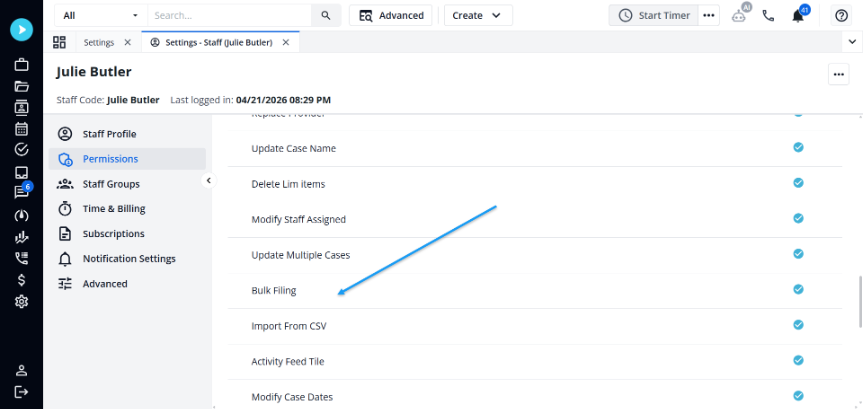
- Assign the Bulk Filing permission to staff or permission groups (Settings > Staff Permissions > Special Permissions).
- Define your firm's document naming format (Settings > Firm Preferences > Documents tab > Document Renaming).
- If your firm plans to use SharePoint Sync: confirm the SharePoint integration is configured in Firm Preferences.
Bulk Filing Permission
A special permission named Bulk Filing controls access to the File Documents workflow:
- Set to Inherit by default for staff and permission roles.
- Enabled for the Administrator Role.
- Staff with the permission enabled can access:
- Create > Upload Documents and Unfiled Documents
- Browse Documents > Upload and Import Unfiled
Automatic Document Renaming — Setting Up the Naming Format
- Admin access required; the Document Renaming section requires Firm Preferences permissions.
- Navigate to Settings > Firm Preferences > Documents tab > Document Renaming section.
- Enable Automatically Rename Documents While Bulk Filing to activate the feature.
- Build a naming format by typing in the format field or selecting from available field tokens (Case Name, Case Number, Alt Case #1, Alt Case #2, Document Type, Document Category, Document Date, Upload Date, Author, Original Document Name).
- As you type, matching field names appear for autocomplete — press Tab or click to insert a token.
- A live example preview updates in real time as you adjust the format.
- Click the ? button at any time to see the full list of available fields.
- Click Reset to Default to restore the format to Original Document Name.
- If you enter an invalid character (
* : ? \ / < > | "), a validation message appears and the Save button is disabled until the character is removed. - If you disable automatic naming and later re-enable it, your previous naming format is preserved and re-populated automatically.

Adding Documents
Upload Documents
To initiate the Upload workflow:
- Top Navigation Bar > Create > Upload Documents
- Browse Documents > Upload
- Browse Documents > Drag & drop onto the grid
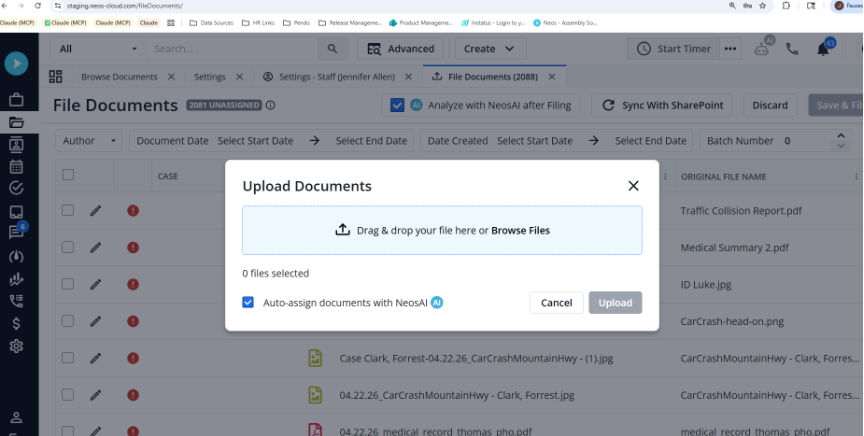
Drag & drop files onto the Upload modal or browse your files. Documents will be uploaded in the background. When finished, a notification toast will show in the top right and in the bell. Click View Batch in either the Notifications side pane or the progress box in the bottom right of the screen to open the File Documents tab filtered to the newly uploaded files.


SharePoint Sync for File Documents
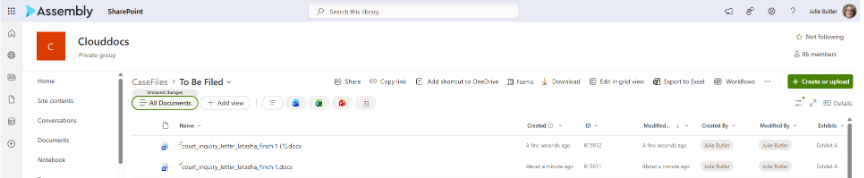
Upload files directly to the To Be Filed directory in your SharePoint CaseFiles drive and sync them into the Neos File Documents tab.
Once configured, access the File Documents tab from Create > Unfiled Documents or Browse Documents > Import Unfiled.
- Upload documents directly to SharePoint in your CaseFiles drive, To Be Filed directory.
- Neos will automatically sync with SharePoint every 15 minutes.
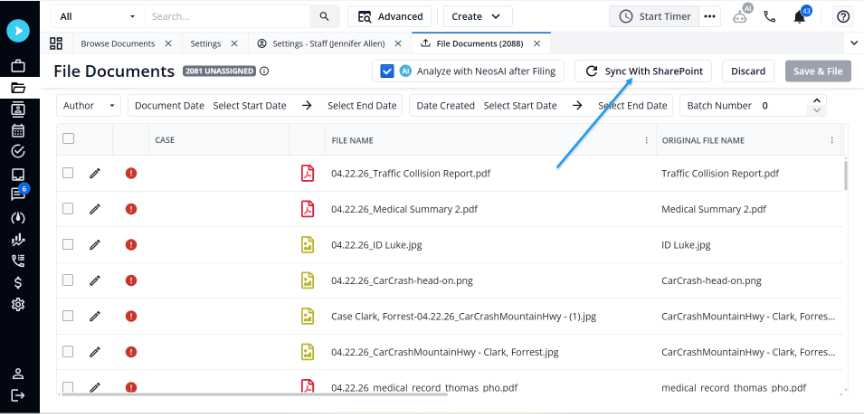
- To sync immediately, click the Sync With SharePoint button at the top of the File Documents tab.
- Any documents uploaded directly to SharePoint will be added to the list of unfiled documents after the sync is complete.
- SharePoint character handling: Characters not supported in SharePoint file or folder names (e.g.,
* : ? \ / < > | ") are automatically stripped from generated file and folder names. - Duplicate file name handling: When saving a document to SharePoint and a file with the same name already exists in the target folder, a numeric suffix is appended automatically (e.g., "Document 1", "Document 2"). The original file is not overwritten.
After syncing, the documents appear in the grid alongside other unfiled documents. You can then file them into specific cases and categories using the standard workflow.


Filing and Organizing Documents
File Documents Tab
To open the File Documents tab, use either entry point:
- Top Navigation Bar > Create > Unfiled Documents
- Browse Documents > Import Unfiled
The File Documents tab lists all unfiled documents currently in Neos.
- Unassigned document counter — A counter pill in the page header displays the number of documents without an assigned case and updates in real time as documents are assigned. Hover over the info icon for details.
- Filter row — Filter the queue by Author, Document Date, Date Created, and Batch Number.
- Case column — When a document is assigned to a case, the Case column shows both the Case Name and Case Number (e.g., Smith, John (200672)).
- Case search — The case search modal defaults to All, so you can search by name, case number, intake number, or any other field from a single starting point.
- Deleted rows — Rows that have been deleted from the grid cannot be selected; their checkboxes are disabled.
When finished making changes, click Save & File to save your edits and move all assigned documents into their respective cases. Click Discard to close the tab without saving any changes. The Save & File button is enabled only when there are changes to save, or when a document has been auto-assigned to a case and is ready to be filed.
Editing Documents
Access the File Documents tab from Create > Unfiled Documents or Browse Documents > Import Unfiled.
You can edit document metadata three ways: in the side pane, inline in the grid, or by bulk-editing multiple rows at once.
Side Pane
- Single-click a row to open the Document Details side pane.
- Assign a case and edit document metadata including File Name, Type, Category, Date, Tags, and Author.
- A thumbnail preview of the uploaded document appears below the editable fields.
Inline Editing in the Grid
- Enter editing mode by double-clicking a row or clicking the pencil icon. Exit editing mode by clicking the checkmark icon to commit your changes, or by clicking outside the row (within the grid).
- Only one row can be in inline edit mode at a time. Rows in edit mode display a greyed-out, non-clickable checkbox and cannot be selected.
- If you select additional rows while a row is in edit mode, the row in edit mode retains its edit state and Save & File remains disabled until the edit is committed.
Click the Pencil Icon or Double-Click a row to make changes. Click the Green Checkbox to commit those changes.
Bulk Actions
- Select one or more rows to reveal the bulk actions bar, which appears in place of the filter row.
- The bar includes a Bulk Actions dropdown with two options: Auto-Assign with NeosAI and Delete.
- The bar also includes six separate inline controls for editing metadata on all selected rows, labeled: Set Case, Change Type, Change Category, Change Date, Change Author, and Change Tags.
- When a bulk action completes, all rows are deselected and the filter row returns.
Resizable Columns
- Resize columns by dragging the column border. Your layout saves automatically and persists the next time you open the tab.
Automatic Document Renaming — In the File Documents Tab
See also: Before You Start › Automatic Document Renaming — Setting Up the Naming Format for how to configure the firm's naming format. The section below describes how renaming behaves during filing.
When automatic document renaming is enabled, uploaded documents are automatically assigned a proposed file name based on the firm's naming format.
- An Original File Name column is available in the File Documents grid (not enabled by default). Enable it through Column Options.
- The Original File Name is read-only — visible in both the grid column and the side pane.
- When automatic naming is enabled, the File Name column auto-populates with a proposed name based on the firm's format and the document's metadata (case, type, category, date, and author).
- The proposed file name updates automatically when you change a document's case, type, category, date, or author.
- You can manually edit the File Name field to override the proposed name. Manual edits are preserved even if metadata changes.
- When multiple documents are selected and metadata is updated via bulk edit, all selected documents have their proposed file names updated accordingly.
- When you click Save & File, the document is filed into the case using the proposed (or manually edited) file name.
- If all fields in the naming format are blank, the file name falls back to the original file name. Empty fields are skipped, and duplicate separators are removed.
- When automatic naming is disabled, the File Name column defaults to the original file name and can be edited manually.
NeosAI Auto-Assignment & Analysis
NeosAI Auto-Assignment Suggestions
- During upload: When uploading unfiled documents, you have the option to use NeosAI to auto-assign the uploaded documents.
- From the File Documents tab: Select one or more rows and choose the option to use NeosAI to auto-assign the selected documents.
If enabled, the content of each document is sent to NeosAI. NeosAI will determine the best type and category from the firm's library and populate these fields on the document.
NeosAI will also list specific case identifiers found in the document and attempt to find a case in Neos that matches. If one is found, it is proposed on the document. If more than one, or none, is found, no case is proposed.
All NeosAI proposals — type, category, and case — remain pending until the user reviews and files the document:
- If the proposed case is correct, click Save & File to file the document to that case.
- If the proposed case is not correct, click the pencil icon on the row to update the case using case search, then click Save & File.
- Type and category follow the same pattern — edit via inline editing, the side pane, or bulk edit before filing, then click Save & File to commit your changes.
The auto-assignment option remembers your last selection — if you enable it, it will be enabled by default the next time you use it.
After auto-assignment runs, each AI-classified document displays a distinct status icon (group of blue stars) in the File Documents grid. Hover over the icon to see a tooltip indicating the document was classified by NeosAI.
Analyze with NeosAI After Filing
Access the File Documents tab from Create > Unfiled Documents or Browse Documents > Import Unfiled.
An option at the top allows you to analyze documents with NeosAI after filing. The option retains its last selection per user.
When enabled, documents will be analyzed automatically after the documents are filed into the selected case(s):
- Document Summary will be generated automatically for all documents.
- Document Extractions will be performed based on the document type selected for each document — for example, when Medical Record document type is selected, the Medical Record Extraction will be automatically performed.
Enable the Analyze with NeosAI after Filing option at the top of the File Documents tab. When enabled, filed documents are automatically analyzed: Document Summaries are generated and Document Extractions are performed based on each document's type.
Features
NeosAI Platinum Users
NeosAI Chat Updates (Tool Data Sources, Auto-Inclusion & Activity Feed Alignment, Newest-First List Ordering)
NeosAI Chat is upgraded across three dimensions in Release 26.03. Two case-aware tools — Get Case Entity and Get Case Contact — are now auto-included in every Chat conversation in case view (no manual setup required), the AI invokes them automatically, and AI responses present case data using human-readable labels aligned to the actual activity types in the case feed. A new animated status indicator displays the tool name and entity being retrieved during generation, replacing the previous minimal "Thinking" state. List-tab data included in Chat (Notes, Values, Counsel, Police, Insurance, Party) is now ordered newest first and respects the same record limits as Case Summary (up to 2,000 records per entity).
Removes the manual step of adding case data sources before each Chat conversation, so users can ask case-specific questions immediately. Shows users which tool and entity is being retrieved during generation rather than a generic "Thinking" state. Brings included list-tab data into alignment with Case Summary — newest records first, with the same record coverage — so AI Chat answers reflect current case state rather than the oldest available records.
- Case Managers & Paralegals — opening NeosAI Chat in a case and asking questions about case entities, contacts, activity feed records, or included list-tab data
- Attorneys — using NeosAI Chat for case review
Tool Data Sources in NeosAI Chat
Two Case-Aware Tools Auto-Included in NeosAI Chat
- NeosAI Chat now auto-includes two case-aware tools the AI can invoke autonomously during a conversation:
- Get Case Entity — retrieves a specific case entity (such as a note, value, document, or party) by id.
- Get Case Contact — retrieves a contact's identity, contact info, and demographic fields. Identity: FirstName, MiddleName, LastName, Prefix, Suffix, IsPerson, AKAFirstName, AKALastName, AKACompanyName. Contact Info: all phones (type + number), email accounts, addresses (type + full address), online accounts (type + value). Demographics: Gender, DateOfBirth, DateOfDeath, Deceased.
- Both tools are auto-included in every case-view Chat conversation — no manual setup required (see "Auto-Inclusion" below).
- Tool results are injected into the AI's context behind the scenes — they are not rendered as visible messages or cards in the chat UI.
- The AI determines autonomously whether to invoke a tool on a given turn; users cannot manually trigger a tool call.
Pre-Seeded Case Context
- When the auto-included tools are active in a Chat conversation, the AI prompt is automatically pre-seeded with full case data, full intake data, the list of parties (id and name only), and the list of available entity types the AI can query.
- Pre-seeded data reflects only the currently open case — no cross-case data is included.
Enhanced Status Indicator
- While the AI is invoking tool calls, the previous minimal "Thinking" indicator is replaced with an animated indicator that displays the tool name and the specific entity being retrieved (e.g., "Get Case Entity: Notes").
- The indicator cycles through tool call events as they arrive from the backend, showing a couple at a time, and updates automatically without requiring user interaction.
- When the AI generates a response without invoking tool calls, the status indicator displays an animated ellipsis — visually distinct from the tool-call cycling state.
Conversation Persistence
- Saving a conversation as a NeosAI Chat note continues to render only the human-readable message thread.
Auto-Inclusion & Activity Feed Alignment
Get Case Entity and Get Case Contact Auto-Included
- When NeosAI Chat is opened in a case view, Get Case Entity and Get Case Contact are already active in the conversation — no action from the user is required.
- The "at least one source required" gate is satisfied automatically by the auto-included tools.
- Manually added sources from the + menu work alongside auto-included tools; the AI uses all active context when generating a response.
- Existing behavior in Intake view (where these tools were not available) is unchanged.
Reasoning Modes & Context Window
- The Broad Scope and Focused Insight reasoning modes are unaffected by tool data sources.
- The 10-message rolling context window applies to auto-included tool records as before.
List Ordering & Higher Record Limits
Newest-First List Ordering
- Open a case and open NeosAI Chat.
- Click Add and include one or more list-tab data sources (Notes, Values, Counsel, Police, Insurance, Party).
- When a message is sent, the records included in the AI prompt are ordered newest first.
- The number of records included per entity now matches Case Summary — up to 2,000 records per entity (e.g., 2,000 notes, 2,000 values).
- Case Summary for Counsel, Police, Insurance, and Party also follows the newest-first / 2,000-record behavior.
Related resources: Chat with NeosAI · Video Walkthrough
Auto-Assign SharePoint Imports with NeosAI
Documents imported from SharePoint as unfiled are now auto-assigned with NeosAI in the background, so users no longer need to manually run auto-assign or open the unfiled document grid afterward. The SharePoint import completes immediately and does not wait for auto-assignment to finish; once auto-assign completes, the unfiled document rows update with the AI-suggested values for Type, Category, Case, Date, and File Name.
Removes a manual step from the SharePoint import flow. Reduces the time between a document arriving in SharePoint and being staged for case filing.
- Case Managers & Paralegals — importing documents from SharePoint into the unfiled documents queue
- Firm Administrators — managing the NeosAI special permission that gates auto-assign
- When unfiled documents are created in Neos via SharePoint sync, Neos automatically queues auto-assignment in the background. Auto-assign is triggered only for documents created via SharePoint sync — not for documents added through other upload paths.
- The SharePoint import completes immediately and does not wait for auto-assign to finish.
- Once auto-assign completes, the unfiled document rows update with the AI-suggested values for Type, Category, Case, Date, and File Name. NeosAI does not always identify every field — values are populated only when the AI can suggest them with confidence.
- Auto-assignment does not run when:
- A document being imported already exists in Neos.
- The user does not have the NeosAI special permission.
- If auto-assign encounters an error, the SharePoint import is unaffected and the imported documents remain accessible as unfiled.
Related resources: Auto-Assign Documents with NeosAI
Enhancements
NeosAI Platinum Users
Dynamic Layouts
Calculated Fields Updates (SUBTOTAL Function, Decimal Field Type, Error Display and Formula Indicator)
Calculated Fields have been upgraded with three enhancements in Dynamic Layouts: a new SUBTOTAL function that sums a field's values across Dynamic Layout lists, a new Decimal case field type that stores values with up to 4 decimal places, and updated error display in the code editor — error messages now appear below the editor (rather than in a hover tooltip) and case fields with a formula attached display with a grayed background in Dynamic Layouts. Two additional Calculated Fields enhancements — nesting ROUND and ROUNDDOWN inside formulas, and expanding the formula limit from 5 to 20 unique fields — were deployed earlier through Maintenance Releases 26.02.02 and 26.02.08, respectively, and are documented under Maintenance Release Items.
Eliminates manual aggregation of values across list-based Dynamic Layouts. Adds decimal precision for calculations that are not currency values. Reduces formula-authoring friction by surfacing errors in a static area instead of hover tooltips that obscure the formula being edited. Helps users distinguish at a glance which fields are formula-driven vs. editable in Dynamic Layouts.
- Firm Administrators — building and maintaining calculated fields and case fields in Settings; configuring SUBTOTAL formulas and the new Decimal field type
- Case Managers & Paralegals — entering data into Dynamic Layouts where calculated fields surface aggregated values and where formula-driven fields are now visually distinct
Building Formulas
SUBTOTAL Function
Open the Add/Edit Section
Open the add/edit calculation modal for a calculated field.
- The Functions header now displays SUBTOTAL to the right of IFS.
- Type
subtotalinto the code editor — the editor will offer the SUBTOTAL function as an option and insertSUBTOTAL()when selected. - Inside the parenthesis, add any Number, Money, or Decimal type case field.
- Combine SUBTOTAL with basic math operators or IFS — the operation is applied to the summation of the chosen field.
Scope of Summation
- SUBTOTAL traverses the Dynamic Layout where the formula is defined and all of its descendants (children, grandchildren, etc.) at any depth.
- Only descendants that share the same Dynamic Layout type as the parent Dynamic Layout are included.
- Dynamic Layouts on other tabs, sibling Dynamic Layouts, and unrelated Dynamic Layouts are not included.
NULL Handling
- If all referenced inputs are blank, the calculated field shows no output.
- If only some inputs are filled in, NULL values are skipped and the partial sum is returned.
- An invalid SUBTOTAL formula displays a validation error.
New Decimal Case Field Type
- Navigate to Settings > Case Fields and click to add a new case field.
- The type dropdown now includes Decimal.
- Decimal stores values with up to 4 decimal places — distinct from Money (which formats as currency) and Number (which stores integers).
- Availability: Decimal supports everything the Number case field type allows — all existing operators and calculations work with Decimal, and Decimal can be used in the same locations as Number.
- When adding a calculation on a Decimal type case field, the field selector includes Money, Number, Decimal, and Date type case fields.
- ROUND and ROUNDDOWN can be used inside the formula or applied to the final output.
- Display: trailing zeros are trimmed (e.g.,
3displays as3,3.5000as3.5). - Input: the field caps user input at 4 decimal places — a fifth decimal place is not accepted.
- Out of scope: existing formulas are not migrated to use the new Decimal type.
Error Display Below Code Editor + Formula Indicator in Dynamic Layout
- In the calculated fields code editor, error messages now appear below the code editor box, left-aligned with the Clear All button.
- The hover tooltip that previously displayed errors at the cursor position has been removed; a red underline still appears to indicate where the error is.
- When the error is corrected, the message clears.
- In Dynamic Layouts, case fields that have a formula attached are displayed with a grayed-out background, making formula-driven fields visually distinct from user-entered fields.
- A formula icon may appear on the right side of the field as an additional visual indicator.
Related resources: Create Field Calculations
NeosAI Workflows
Limits, Policy Number, and Claim Number in AI Insurance Data Source
When an AI tag uses Insurance Data as its source, the AI request now includes the insurance record's Limits, Policy Number, and Claim Number fields alongside the existing Insurance Type, Insurer, and Adjuster fields. No changes to the insurance UI or data entry.
AI-generated content reflects the full insurance record. Removes the need to supplement AI output with values that were stored on the insurance record but not previously sent to the AI.
- Case Managers, Paralegals & Attorneys — running AI tags that pull Insurance Data on cases with Limits, Policy Number, or Claim Number populated
- When an AI tag's source is set to Insurance Data, the AI request now includes the insurance record's Limits, Policy Number, and Claim Number values (when populated) alongside the existing Insurance Type, Insurer, and Adjuster values.
- Format sent to the AI: "The insurance details are, insurance type: {insurance type title}, Limits: {limits}, policy number: {policy number}, claim number: {claim number}, insurer: {insurer full name}, adjuster: {adjuster full name}."
- Fields that are null or empty on the insurance record are gracefully omitted.
- No changes to the insurance UI or data entry.
Related resources: Data Source Fields – NeosAI
Automation
New Automation Trigger — When Case Field is Updated
Automations now support a new When Case Field is updated trigger that fires when one of 23 standard case fields is updated, expanding the actions firms can drive from changes captured in the case record. The trigger supports conditions for the specific case field, the staff member who made the update, the case type, and the case status, and runs on bulk updates as well as single-record updates.
Removes the gap between case-data changes and downstream automation — when one of the 23 supported case fields is updated, automations can now run automatically. Reduces manual coordination tied to data updates that previously had no automation trigger.
- Firm Administrators — configuring the new trigger and its conditions in the Automations module
- Case Managers & Paralegals — receiving downstream automation outputs when one of the 23 supported case fields is updated
- Open Automations and create or edit an automation.
- Open the Trigger dropdown — When Case Field is updated appears as an option.
- When When Case Field is updated is selected, the following conditions display:
- Case Field — single-select, required, no default. Lists all 23 standard case fields: Alternate Case Number 1, Alternate Case Number 2, Referred By, Referred To, How did you hear about us?, Marketing Campaign, Date of Incident, Class, Dormant, More Info, Client Reference ID, Opened, Closed, Reassigned, Case Name, Billing Client, Synopsis, Intake Date, Intake Staff, Case Title, Docket, Court, Judge.
- Updated By — defaults to Any; multi-select. Scope the trigger by Staff, Staff Role, Trigger Staff, or Primary Staff.
- Case Type — defaults to Any; multi-select; only active case types are selectable.
- Case Status — defaults to Open; single-select, non-nullable; options: Open, Closed, Open/Closed.
- The Change Intake Status action is not available when this trigger is selected.
- When the configured case field is updated — including via bulk update — and all conditions are met, the automation actions run.
- If field conditions are set by linking an Advanced Search report, the automation runs only when the updated case or intake also appears in the Advanced Search results.
Related resources: Add Automation · Video Walkthrough
QuickBooks SDK Users
Specific Permission Errors in the QuickBooks Integrator Customer Requested
The QuickBooks Integrator now displays a specific error message that identifies the missing permission whenever an action fails or a tab cannot load because of permission. The message names the user, the permission action (Add, Edit, View, or Delete), and the area where the permission is required.
Replaces a generic permission-denied error with a specific message identifying the missing permission. Reduces time spent troubleshooting permission issues and removes back-and-forth between users, IT, and Customer Support to identify which permission to grant.
- Firm Administrators — granting the specific permission identified in the error message
- Bookkeepers & Accounting — posting checks and other QuickBooks Integrator transactions
- When a user attempts an action in the QuickBooks Integrator that fails due to a missing permission (for example, posting a check), an Insufficient Permissions dialog opens identifying the user, the permission action (Add, Edit, View, or Delete), and the area where the permission is required (for example, MiniDirectories or NameLinks).
- The same specific error displays when a tab cannot load due to a missing permission.
- Example message: "Laura A. Rudolf does not have permission to View within MiniDirectories."
- The administrator can use the message to locate and update the missing permission directly, without first reproducing the failure.
Related resources: Connect the Neos QuickBooks Integrator
All Users
Dynamic Layouts
Auto-Expanding Alphabetic Fields Customer Requested
Alphabetic fields in Dynamic Layouts now grow vertically with their content — starting at one line, expanding up to 15 lines as the user types or as existing content loads, with a manual resize handle always available for further expansion. Empty fields remain at single-line height.
Removes in-field horizontal and vertical scrolling on text-heavy Dynamic Layout fields. Reduces friction during data entry and case review by making long content visible without extra interaction.
- Case Managers & Paralegals — entering and reviewing alphabetic-field content (incident descriptions, narrative fields, notes) in Dynamic Layouts
- Attorneys — reading alphabetic-field content during case review
- Open any Dynamic Layout record that contains an alphabetic field.
- An empty field renders at single-line height with no extra vertical space allocated.
- As content is typed, pasted, or loaded, the field grows vertically to display all content without in-field scrolling, up to a maximum of 15 visible lines.
- A resize handle is always available on the field. Drag it downward to expand the field beyond the auto-expanded height; the field scrolls within itself if content exceeds the manually expanded height.
- Manually expanded heights do not persist across sessions — when the record is re-opened, the field returns to its auto-expanded height (up to 15 lines based on content).
- The behavior applies to all alphabetic fields in Dynamic Layouts, across all three display modes: Auto, Always List, and Always Flat.
- Field expansion does not obscure adjacent fields or page controls.
Related resources: Add Dynamic Layout
Platform & Usability
Unsaved Changes Warning on Intake and Case Tabs Customer Requested
Users now see a browser confirmation dialog when they attempt to leave a Neos page that has unsaved changes on an Intake or Case tab. The dialog appears when closing the browser tab or window, refreshing the page, or typing a new URL in the address bar — giving users the chance to stay on the page and save their work before navigating away.
Prevents accidental loss of in-progress work when a browser tab is closed, refreshed, or redirected to another site. Removes the rework of recreating notes, intake data, or case-tab updates that were lost when a browser tab was closed, refreshed, or redirected.
- Case Managers & Paralegals — entering notes and updating case-tab data on open cases
- Intake Specialists — entering and updating intake-tab data during lead capture and qualification
- Legal Assistants — preparing case-tab content as part of document and case-file work
- Attorneys — reviewing or updating case-tab content during case work
Where the Warning Applies
- Intake tabs — all tabs on an intake record.
- Case tabs — all tabs on a case record, including a Note that is mid-entry (for example, a note with body text typed but no Topic selected yet).
When the Warning Appears
- Closing the browser tab or window while unsaved changes exist on the current Intake or Case tab.
- Refreshing the page using F5, Ctrl+R, or the browser refresh button.
- Typing a new URL in the address bar to navigate away from Neos.
What the Warning Does
- The browser displays a native "Leave site?" confirmation dialog warning that changes may not be saved.
- Cancel (or Stay, depending on the browser) keeps you on the page with your unsaved work intact.
- Leave closes, refreshes, or navigates away — unsaved changes on the page are discarded.
When the Warning Does Not Appear
- After a successful Save, the page is treated as clean and the warning does not appear on the next browser action.
- When there are no unsaved changes on the current page.
- When content auto-saves inline (for example, document metadata fields) and no other unsaved changes exist on the page.
- On the Neos login page or other authentication and identity screens.
- When the user navigates with the browser Back or Forward buttons — coverage for back/forward navigation is planned for a future release.
Billing & Accounting
UTBMS Expense Codes Mini-Directory Customer Requested
A new mini-directory for UTBMS Expense Codes lets firms set a default unit price for each expense code. When a user selects an expense code on a value entry, the cost defaults to the unit price configured in the mini-directory.
Eliminates the manual lookup of expense rates each time a value entry is created. Reduces inconsistencies in expense pricing across cases. Cuts down on invoice corrections caused by incorrect or missing expense rates.
- Firm Administrators — configuring unit prices and active status for the firm's UTBMS Expense Codes in the new mini-directory
- Bookkeepers & Accounting — generating invoices that consume the unit prices defaulted on value entries
- Case Managers & Paralegals — selecting UTBMS Expense Codes when creating value entries; the cost-per-unit and amount default from the mini-directory
Navigate to Mini-Directories and open the UTBMS Expense Codes mini-directory.
Directory Columns
- Activity (immutable) — describes the activity that applies to the UTBMS Expense Code (e.g., copying, printing).
- UTBMS Expense (immutable) — shows all UTBMS Expense Codes.
- Unit Price — currency field; defaults to $0.00 and can be updated by users with permission.
- Active? — checkbox to enable or disable a code from appearing in the UTBMS dropdown on value entries.
- The +Add button is hidden and the Trash Can is disabled — users cannot add or delete codes in this mini-directory.
- All columns are filterable through the three-line icon in the column header.
Permission & Save Behavior
- Permission required: "Can edit mini-directories" must be enabled to change unit price or active status. Users without the permission receive a permissions toast when attempting to save edits.
- When changes are made to unit price or active status, the Save Changes button is triggered.
- Discard reverts unsaved changes.
- Save Changes commits the edits.
- Existing value entries are preserved: changes to a code's unit price or active status only apply to value entries created after the change; existing entries are unaffected.
Default Behavior on Value Entry
- When a user selects an E UTBMS code on a value entry, the cost-per-unit and amount default to the unit price set on the mini-directory.
- Manual override is preserved: when a user manually updates the value amount after selecting a UTBMS code, the manual input is not overwritten unless the user reselects the UTBMS code.
- Disabled codes are excluded from the dropdown: when a code's active checkbox is disabled and saved, that code no longer appears in the UTBMS dropdown on value entries; existing value entries using that code are unchanged.
- Dropdown formatting: the UTBMS dropdown displays the code and activity/description on one line within the dropdown width; descriptions longer than 50 characters are truncated with ellipses.
- Time entries are unaffected: UTBMS Expense unit prices do not override the rate or cost on time entries.
Memo Hover on Time Entries in Value Customer Requested
When a time entry's Memo field is locked or otherwise read-only on the Value tab, users can now hover over the field to read the full memo text in a tooltip. The existing tooltip behavior is preserved.
Removes the need to highlight, drag, or arrow through the field to read longer memos. Makes locked time entry memos readable at a glance during invoice review.
- Bookkeepers & Accounting — reviewing locked time entries on the Value tab during invoice generation and reconciliation
- Open the Value tab on a case and locate a time-type value entry where the Memo is read-only.
- Hover the cursor over the disabled Memo field to display the full memo text.
- Existing tooltip behavior is unchanged.
Edit Check or Deposit Now Prefills Existing Values Customer Requested
When editing a single check or deposit from the Accounting grid, the Edit modal now prefills the Company, Debit Account, and Credit Account fields with the existing values from the selected row. When more than one row is selected for editing, the fields remain empty so a single value can be applied across the batch.
Eliminates manual re-entry when adjusting a single check or deposit. Reduces data-entry errors caused by retyping values that already exist on the record.
- Bookkeepers & Accounting — editing individual check or deposit records in the Accounting grid
- Navigate to Accounting > Checks or Accounting > Deposits.
- Select a single row using the checkbox and click Edit. The Edit modal opens with Company, Debit Account, and Credit Account prefilled from that row's existing values (when not null).
- Select more than one row and click Edit. The Edit modal opens with the three fields empty — existing behavior — so a single value can be applied to all selected records.
Related resources: UTBMS Expense Codes Mini Directory · Navigating Grid Columns and Tabs · Adding Value Items · Adding a Manual Value Tab Time Entry · Edit Checks and Deposits
Case Management & Browsing
Companion Group in Advanced Search — Column, Filter & Bulk Assignment Customer Requested
Advanced Search now supports Companion Groups as a column, a filter, and a bulk action across Cases, Intakes, and Intakes-and-Cases. The Companion Group column shows all groups a record belongs to, comma-separated. A new Add to Companion Group bulk action lets users add many selected records to an existing or new Companion Group from search results, using the existing Select Companion Case Groups modal.
Removes the one-record-at-a-time bottleneck when organizing large batches of related cases or intakes into Companion Groups. Surfaces Companion Group membership directly in search results so reporting and triage on related cases no longer require opening individual records.
- Case Managers & Paralegals — viewing Companion Group membership in Advanced Search results and adding multiple records to a Companion Group via Bulk Actions
- Firm Administrators — setting up Companion Groups across cases and intakes; gating bulk Companion Group assignment via existing Companion Case Groups permissions
Companion Group as a Column
- Run an Advanced Search for Cases, Intakes, or Intakes and Cases.
- Click the Columns button and add Companion Group from the column chooser.
- The column displays each record's Companion Group names. Records in multiple groups show all group names comma-separated. Records not in any group show the column as blank.
- The column supports filter, resize, and show/hide. Sorting and group-by are not supported on this column due to its multi-value display.
- The Companion Group column is included in exports (Excel, CSV, PDF) and saved search subscriptions.
Companion Group as a Filter
- When building an Advanced Search query for Cases, Intakes, or Intakes and Cases, add a filter group and select Companion Group as the field.
- Operators available: Includes any of, Equal, Is Blank, Is Not Blank, Not Equal, Excludes.
- Search results include records matching the Companion Group criteria.
Bulk Add to Companion Group
- Run an Advanced Search and select multiple records using the row checkboxes (or Select All).
- Click Bulk Actions and choose Add to Companion Group.
- The existing Select Companion Case Groups modal opens with the established two-panel layout:
- Left panel — list of all existing Companion Groups (Group Name and Case Count).
- Right panel — Group Members for the selected group (Case #, Alt Case #, Date Opened, Case Type, Party Name, Status, Multi Groups).
- Select an existing group, or type a new group name in the Add input above the groups list to create a new group.
- Click Save — selected records are added to the chosen group. A confirmation displays "X records added to [Group Name]". Records already in the group are silently skipped (not duplicated).
- A progress bar displays during the bulk action; bulk assignment completes within 5 seconds for up to 100 records.
- The Select Companion Case Groups modal layout has also been corrected — the modal title, Groups panel header, and Enter a New Group Name input no longer overlap.
Star Icon Marks the Favorite Column on Browse Cases Customer Requested
The Favorite column in Browse Cases now displays a 16px black star icon in its column header, signaling that the column shows favorited cases at a glance whether or not the user has any cases marked as favorites.
Makes the Favorite column self-identifying, even when no rows are currently favorited. Removes ambiguity about which column toggles favorite status on Browse Cases.
- Case Managers & Paralegals, Attorneys — using the Favorite column on Browse Cases
- Open Browse Cases.
- The Favorite column header displays a 16px black star (no fill).
- Sorting and existing favorite-toggle behavior on the column are unchanged.
Related resources: Advanced Search Filter Options – A-C · Bulk Add Cases to a Companion Group · Video Walkthrough · Favorite Cases · Browse Cases
Contacts & Communication
Premium Texting Email Notifications Customer Requested
For firms with Premium Texting, users who are subscribed to a text-message conversation and select Neos and Email now receive an email notification when a new text message arrives, with a Reply in Neos button that opens the conversation thread. Notification preferences in the staff profile also now use a three-option dropdown — None, Neos Only, or Neos and Email — letting users choose how they are notified about activity in Neos.
Ensures important text replies are not lost in a long notification list and can be acted on from anywhere — incoming texts reach subscribed users by email, on the go, with one click back into the Neos conversation thread.
- Case Managers & Paralegals, Attorneys, Legal Assistants — at firms with Premium Texting, receiving the new email notification (with Reply in Neos button) when subscribed to a text-message conversation and using "Neos and Email"
- Named Partners, Attorneys, Case Managers & Paralegals, Legal Assistants, Bookkeepers & Accounting, Intake Specialists, Firm Administrators — adjusting personal notification preferences in the Staff Profile (None / Neos Only / Neos and Email)
Notification Settings Dropdown — All Users
- Navigate to Staff Profile > Notification Settings.
- Click the dropdown for any notification option to choose from:
- None — user receives no Neos or email notifications for that category.
- Neos Only — user receives only Neos in-app notifications.
- Neos and Email — user receives both Neos in-app and email notifications.
Text-Message Email Notification — Premium Texting
- A user who is subscribed to a text-message conversation and has set their text message notification preference to Neos and Email receives an email when a new text message arrives.
- The email subject is "You have received a text message" and contains:
- The recipient's name
- The sender's name and timestamp
- The full text-message conversation
- Contact name and AKA, phone number and number type
- Conversation topic
- All subscribed staff (comma separated)
- A Reply in Neos button
- Clicking Reply in Neos:
- If the user is logged into Neos, opens the text-message conversation thread in a browser window.
- If the user is not logged in, opens Neos and after login routes the user to the text-message conversation thread.
- Replies sent to the notification email itself are not processed (do-not-reply email).
- If the firm does not have Premium Texting, users do not receive this email even if they select Neos and Email.
Customizable Email Type Labels on Contacts, Parties, and Providers Customer Requested
The Email Type field now supports custom values when adding or editing an email on a contact, the case Party Tab, or the Provider Card — matching how Phone Type already works. Users can type a custom label (up to 32 characters) directly in the Email Type dropdown and save it with the email record. The default options — Personal, Business, and Other — remain available, and custom values are scoped to the underlying contact.
Eliminates the loss of context that comes from forcing every non-default email into "Other." Brings email type behavior into alignment with the existing phone type behavior, removing the need to remember different rules for similar fields.
- Legal Assistants — adding and editing email addresses on contacts, case Parties, and Providers during data entry
- Case Managers & Paralegals — referencing email type values on contacts, case Parties, and Providers when working cases
Adding a Custom Email Type on a Contact
- Open a contact and add or edit an email address.
- Click the Email Type dropdown.
- Default options Personal, Business, and Other remain available and are not required.
- Type a custom label (up to 32 characters) in the filter row at the top of the dropdown.
- Select the Add this custom value option to create the custom type.
- Save the email — the custom type is stored with the record and appears in the Type column.
- Existing email records with default types are unaffected.
- Custom email types are reflected across contact views and are included in contact exports/reports.
Adding a Custom Email Type from the Party Tab or Provider Card
- Open a case and navigate to the Party Tab or Provider Card.
- Add or edit an email address.
- Click the Email Type dropdown.
- Default options Personal, Business, and Other remain available.
- Type a custom label (up to 32 characters) and select Add this custom value to create the custom type.
- Save the email — the custom type is stored with the record and appears in the Type column.
Scope of Custom Email Types
- Custom email types are contact-scoped — a custom type created on one contact does not appear in the Email Type dropdown for any other contact.
- The Party Tab and Provider Card pull from the underlying contact record, so a custom type stays with that contact wherever it appears.
Default Email Type in Advanced Search
- Custom email type values are available in Advanced Search as both a column and a filter.
- Open the column chooser in Advanced Search and add Default Email Type to display the email type — including any custom values — on returned records.
- Open the filter criteria and select Default Email Type to filter on default and custom email type values.
Document Name Display & Email Attachment Multi-Select Customer Requested
The document icon on event and email attachments now displays the first 25 characters of the document name with an ellipsis, giving every attachment a consistent size regardless of file name length. The Send Email modal also restores multi-select on the Add Attachment grid so users can attach multiple documents in one action; the Event modal continues to use single-select.
Creates a consistent visual appearance for attachments regardless of file name length. Restores faster email attachment workflows by allowing multiple documents to be attached at once.
- Case Managers & Paralegals — attaching documents to events and emails as part of case communication
- Legal Assistants — preparing emails with multiple document attachments
Document Name Display
- When a document with a name longer than 25 characters is added as an attachment to an event, the icon displays the first 25 characters followed by an ellipsis.
- When the same document is attached to an email — as a reply, reply all, forward, or new send — the icon displays the first 25 characters followed by an ellipsis.
- The icon size remains consistent regardless of document name length.
Email Attachment Multi-Select
- Open the Send Email modal and click Add Attachment.
- The Add Attachment grid now shows multi-select checkboxes — multiple documents can be selected and attached in one action.
- The Event modal's Add Attachment grid continues to use single-select (no multi-select).
Up to 10 Recent Cases, Intakes, and Contacts — Neos Web Main-Search Dropdown Customer Requested
The recents dropdown on the Neos web main search now displays up to 10 items, doubling the previous cap of 5. This makes a longer working set of cases, intakes, and contacts reachable in one click from the top of every Neos page.
Surfaces a larger working set of recently used records on the Neos web main-search dropdown so users spend less time re-searching for cases, intakes, and contacts they have already opened. Reduces context-switching during everyday navigation.
- Case Managers & Paralegals — using the Neos web main-search dropdown to jump back into recently opened cases or intakes
- Legal Assistants — returning to recently used cases from the Neos web main-search dropdown
- Attorneys — opening recent cases or intakes from the Neos web main-search dropdown
- Open the Neos web main search at the top of any page and view the recents dropdown.
- The dropdown now displays up to 10 items (previously 5).
- Cases, intakes, and contacts all continue to appear in the dropdown.
- Recents are user-specific (scoped by staff and firm).
- Now when users tag to a case or intake in the Neos Outlook add-in, those cases and intakes will be visible in the "recents" list in Neos web.
Related resources: Notification Settings Tab · Video Walkthrough · Adding an Email · Advanced Search Filter Options – D-H · Manage Event Attachments · Emailing a Note · Accessing Neos Search
Admin
Permissions Page Headers Stay Visible While Scrolling Customer Requested
The Title and Header on the General Permissions and Special Permissions pages now stay anchored to the top of the page while scrolling, so users always see which permission set they are configuring.
Reduces orientation loss when working through long permission lists by keeping the page Title and column Header visible at all times.
- Firm Administrators — configuring General Permissions and Special Permissions for staff and permission groups
- Navigate to Settings > Staff & Permission Groups and open a staff member or permission group.
- Open the General Permissions or Special Permissions tab.
- As you scroll through the list, the page Title and column Header remain anchored at the top of the page and are not part of the scroll area.
Related resources: Accessing Permission Groups · Access and Assign Staff Permissions
Maintenance Release Items
NeosAI Platinum Users
Function Within a Function — ROUND and ROUNDDOWN in Calculated Fields Already Deployed
ROUND and ROUNDDOWN can now be used inside another function within a Calculated Field formula. When ROUND or ROUNDDOWN appears inside a formula's parenthesis, it rounds within that nested expression rather than rounding the final output, expanding the range of formulas that can be expressed in a single Calculated Field.
Removes the previous restriction that limited ROUND and ROUNDDOWN to the final formula output, eliminating the need to split formulas across multiple Calculated Fields.
- Firm Administrators — building Calculated Field formulas in Settings that require rounding inside nested expressions
- Case Managers & Paralegals — entering data into Dynamic Layouts where Calculated Fields use nested ROUND or ROUNDDOWN to derive intermediate values
- Open the add/edit calculation modal for a Calculated Field.
- ROUND and ROUNDDOWN can now be used inside another function within a formula.
- When a ROUND or ROUNDDOWN appears inside a formula's parenthesis, it rounds within that nested expression rather than rounding the final output.
- Example:
DATEDIF(date1, date2) - (ROUNDDOWN((DATEDIF(date1, date2) / 7), 0))rounds the inner(DATEDIF / 7)value rather than the final formula output.
Up to 20 Unique Fields per Calculated Field Formula Already Deployed
The code editor for Calculated Fields now accepts up to 20 unique fields in a single formula, up from the previous limit of 5. Existing Calculated Fields with fewer than 5 fields are unaffected and can be edited up to the new 20-field cap.
Removes the five-field cap that previously forced complex formulas to be broken into multiple Calculated Fields.
- Firm Administrators — building Calculated Field formulas in Settings that reference more than five unique case fields
- Case Managers & Paralegals — entering data into Dynamic Layouts whose Calculated Fields reference up to 20 unique case fields
- Open the add/edit calculation modal for a Calculated Field.
- The code editor now accepts up to 20 unique fields in a single formula (previously limited to 5).
- Existing Calculated Fields with fewer than 5 fields are unaffected — users can edit existing formulas and add fields up to the new 20-field cap.
Related resources: Create Field Calculations
All Users
Live Memo Updates on Existing Invoices Customer Requested, Already Deployed
When a value entry's memo is updated after the invoice has been generated, the updated description now flows through to the invoice detail view and to PDF, Word, and LEDES98B downloads — without requiring the invoice to be deleted and regenerated. The change brings the line-item description into alignment with the other line-item fields (Amount, Rate, Date) that already read live from the value entry on non-void invoices.
Removes the manual delete-and-regenerate workaround when adjusting value-entry memos after invoicing. Keeps invoice descriptions in step with the source value entry so corrections do not require deleting and regenerating the invoice.
- Bookkeepers & Accounting — adjusting value-entry memos and LEDES descriptions after invoice generation, then re-downloading the invoice in PDF, Word, or LEDES98B
- Given an invoice in Draft, Pending, Due, Overdue, or Paid status, when a user updates the memo on a tied value entry, the description on that line item is updated wherever the invoice is viewed or downloaded.
- PDF and Word downloads reflect the updated memo (or LEDES Description on non-time items, depending on firm preference — see the maintenance-released PDF/Word LEDES Description Export for the firm-preference behavior).
- LEDES98B downloads reflect the updated memo or LEDES Description according to the firm preference.
- When the firm preference for LEDES Description is set to LEDES Description, updating the LEDES description on a tied value entry flows through to LEDES98B downloads (this update appears in the LEDES98B output, not in the Description column on the invoice detail view).
- Permission gating — the existing Modify Locked Value Entries permission applies. Users without this permission cannot edit value items on Due or Paid invoices.
- Void invoices are unchanged — they continue to read from the immutable invoice line item snapshot.
Related resources: Edit Invoice Value Items
LEDES Export Updates (LSS-SW10 Expense Format, PDF/Word LEDES Description, Null Units/Unit Cost, LEDES Description in Advanced Search) Customer Requested, Already Deployed
A coordinated set of updates to LEDES and invoice export behavior delivered across three maintenance releases: the LSS-SW10 expense format now includes the LEDES Description or value entry memo according to the firm preference; PDF and Word invoice exports honor the same LEDES Description firm preference for non-time line items; line items with null Number of Units or Unit Cost can now be exported successfully; LEDES Description is exposed as a column and filter on Value Advanced Search; and a follow-up format hotfix consolidates the LSS-SW10 expense description and LEDES/Memo into a single quoted field.
Consistent LEDES Description / Memo output across all invoice export formats. Removes the export-blocking issue that prevented invoices with null Units or Unit Cost from being downloaded. Adds direct filtering and reporting on LEDES Description without opening individual value entries. Eliminates the LSS-SW10 expense format inconsistency introduced in the original release.
- Bookkeepers & Accounting — generating LEDES98B, LSS-SW10, PDF, and Word invoice exports and managing the LEDES Description firm preference
Maintenance Release Schedule
- Add LEDES Description / Memo to LSS-SW10 Export & LEDES Description in Advanced Search — Maintenance Release 26.02.02, deployed April 2, 2026
- Allow Null Line Item Units / Unit Cost & Add LEDES Description to PDF / Word Export — Maintenance Release 26.02.06, deployed April 14, 2026
- Change LSS-SW10 Expense Description Format — Maintenance Release 26.02.08, deployed April 23, 2026
Add LEDES Desc/Memo to LSS-SW10 Export & LEDES Description in Advanced Search
Released with Maintenance Release 26.02.02 (April 2, 2026)
LSS-SW10 Expense Format
- The Expenses section of the LSS-SW10 export now includes a trailing field for the LEDES Description or value entry memo, driven by the firm's LEDES Description preference.
- When the firm preference is set to LEDES Description, the trailing field contains the LEDES Description from each value entry.
- When the firm preference is set to Value Entry Memo, the trailing field contains the value entry memo.
- The Fees section is unchanged — this update applies only to the Expenses section.
- The change applies to LSS-SW10 downloads from Accounting > Invoices, Case > Invoices, and Advanced Search.
LEDES Description in Value Advanced Search
- Open Advanced Search on a Value primary record.
- Open the filter criteria — LEDES Description is selectable as a filter, with free-text operators.
- Open the column chooser — LEDES Description is selectable as a column.
- The LEDES Description column shows the LEDES Description on value entries that have the field populated. Character limitations match the existing Memo field.
Null Line Item Units/Unit Cost & PDF/Word LEDES Description
Released with Maintenance Release 26.02.06 (April 14, 2026)
Line Items with Null Units or Unit Cost Can Now Export
- Invoices that contain line items with null LineItemNumberOfUnits or null LineItemUnitCost can now be exported successfully to LEDES98B and LSS-SW10. Previously, a validation issue blocked these exports.
PDF/Word Invoice Export Honors LEDES Description Firm Preference
- When the firm preference for LEDES Description is set to LEDES Description, exporting an invoice to PDF or Word shows the LEDES Description on non-time line items.
- When the firm preference is set to Memo, PDF and Word exports show the memo (existing behavior).
- Time-type items always use the value entry description as the description on the invoice — there is no LEDES Description substitution for time items.
LSS-SW10 Expense Description Format Hotfix
Released with Maintenance Release 26.02.08 (April 23, 2026)
Consolidated Description Field
- The LSS-SW10 Expenses section now exports as:
Service End Date | UTBMS Code | QTY (always 1.00) | Due Amount | "[UTBMS Expense Code] [UTBMS Description] LEDES Description OR Value Entry Memo". - The LEDES Description or value entry memo (driven by firm preference) is now placed inside the same quoted field as the bracketed UTBMS expense code and description.
- An earlier version of this format included an erroneous trailing pipe between the bracketed UTBMS field and the LEDES/Memo value; the pipe has been removed.
Related resources: Advanced Search Filter Options – I-Q · Edit Invoice Value Items · Time & Billing Tab (Firm) · Download Invoices
DTF Only Option on Invoice Generation Customer Requested, Already Deployed
A new DTF Only checkbox on the Generate Invoices and New Invoice modals lets users limit invoice generation to Due-to-Firm value entries. When DTF Only is checked, the Costs checkbox is unchecked and disabled; unchecking DTF Only re-enables the Costs checkbox. Fees remains independent and can be combined with DTF Only.
Removes the manual workaround firms previously used to exclude case expenses — including those with leftover balances — from DTF-only invoices. Speeds up bulk invoice generation for firms that need to invoice DTFs as a separate batch.
- Bookkeepers & Accounting — generating bulk invoices in Accounting > Invoices and case-level invoices in Case > Invoices
Accounting > Invoices — Generate Invoices Modal
- Open Accounting > Invoices and click Generate Invoices.
- The DTF Only checkbox appears to the right of the Costs checkbox, unchecked by default.
- When DTF Only is checked, the Costs checkbox is unchecked and disabled. Unchecking DTF Only re-enables Costs.
- With DTF Only checked and Fees unchecked, the grid shows only invoiceable, unbilled DTF-type value entries (respecting any other applied filters).
- With DTF Only checked and Fees checked, the grid shows DTF-type value entries plus invoiceable, unbilled fees.
- With DTF Only unchecked and Costs/Fees checked, the grid continues to show all invoiceable, unbilled costs and fees (including DTFs) — existing behavior.
Case > Invoices — New Invoice Modal
- Open a case and navigate to Invoices, then click New Invoice.
- The DTF Only checkbox appears to the right of the Costs checkbox, unchecked by default.
- The same Costs disable/enable rule applies as in Accounting > Invoices.
- With DTF Only checked, the Amount Unbilled reflects only DTF-type value entries (and Fees, if Fees is also checked).
Related resources: Add New Invoice · Bulk Generate Invoices
Have an idea for a future release?
In the Neos application, click the ? icon in the upper-right corner, then select "Suggest an Idea" to submit your suggestion directly to the product team.
Need help?
Have a question or run into an issue? Check out our Knowledgebase via the ? icon in Neos or reach out to Customer Support at neossupport@assemblysoftware.com or 410-999-8220. We're here to help.