January may be dark and gloomy, but the new Neos features are a beacon of shining light (or at least something to look forward to). You'll get to enjoy them on the morning of February 7! For even more cheer during the dregs of winter, watch the on-demand “New in Neos” webinar” with the always-effervescent Bryan Billig.
New Features
- First Insurance Column in Advanced Search for Cases
- Case Name and Case Type as New Columns to Browse Documents (Customer request)
- Time Tracking Features (Customer request; released on Jan 4)
Enhancements
- New Field Added to Documents: Document Summary
- Ring Central Enhancement
New Features
First Insurance Column in Advanced Search for Cases
You can now run reports using information from the first insurance record listed in the insurance tab (which, for some firms, is usually the client's insurance record).
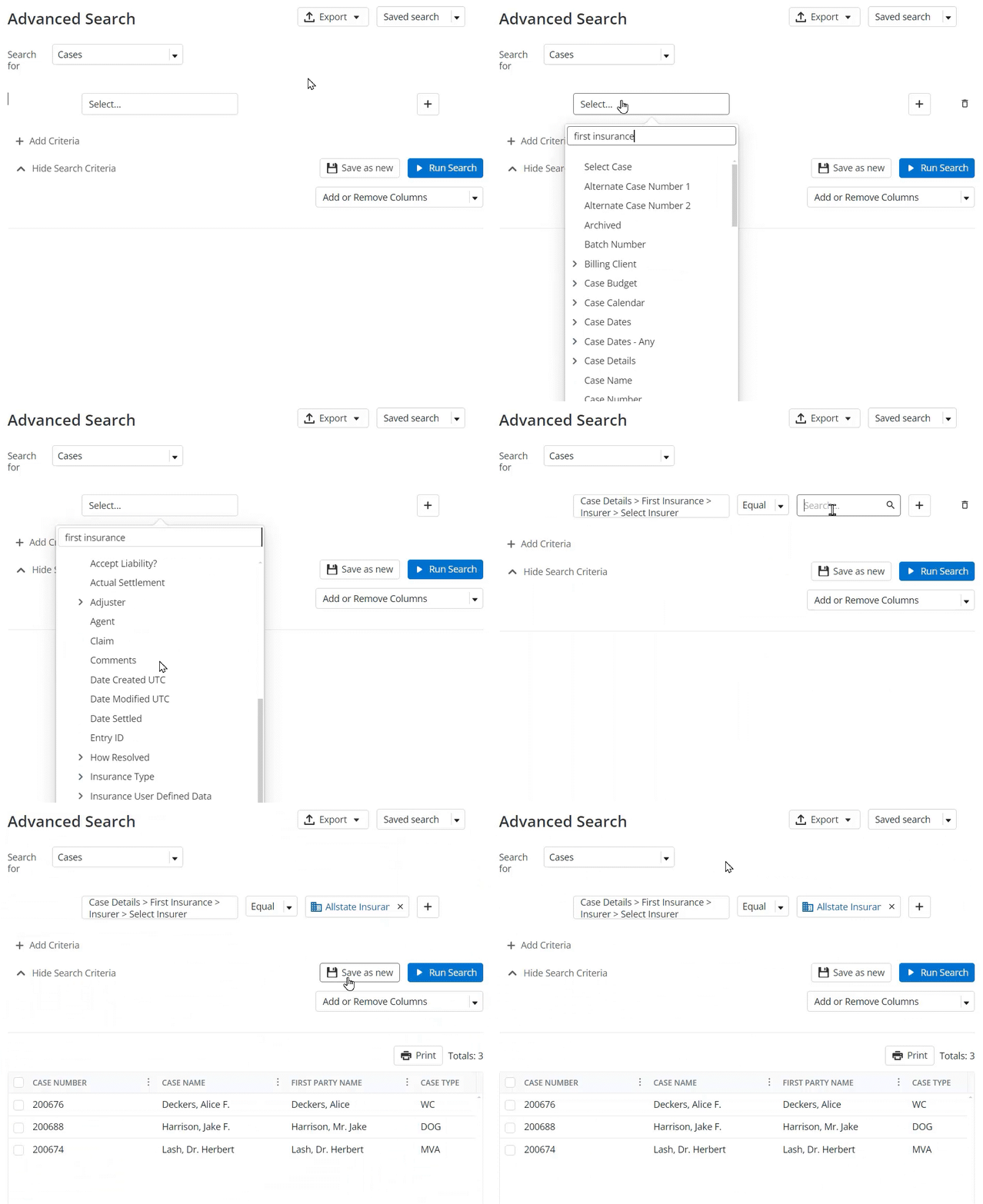
How to use it
All insurance fields for the first insurance record are now available as Advanced Search columns and filters on a case or insurance search.
- Filters are located Under "Case Details"
- Includes all standard fields and UDFs
- Filters and columns are available in Case, Intakes & Cases, and Insurance search types
Global Documents - Add Case Name and Case Type as Columns to Browse Documents (Customer request)
When looking at the Browse Documents list, you will now have the ability to see the Case Name and Case Type of the case containing the documents. You can also filter the Browse Documents list by Case Type, allowing you to find all related documents in different case types.
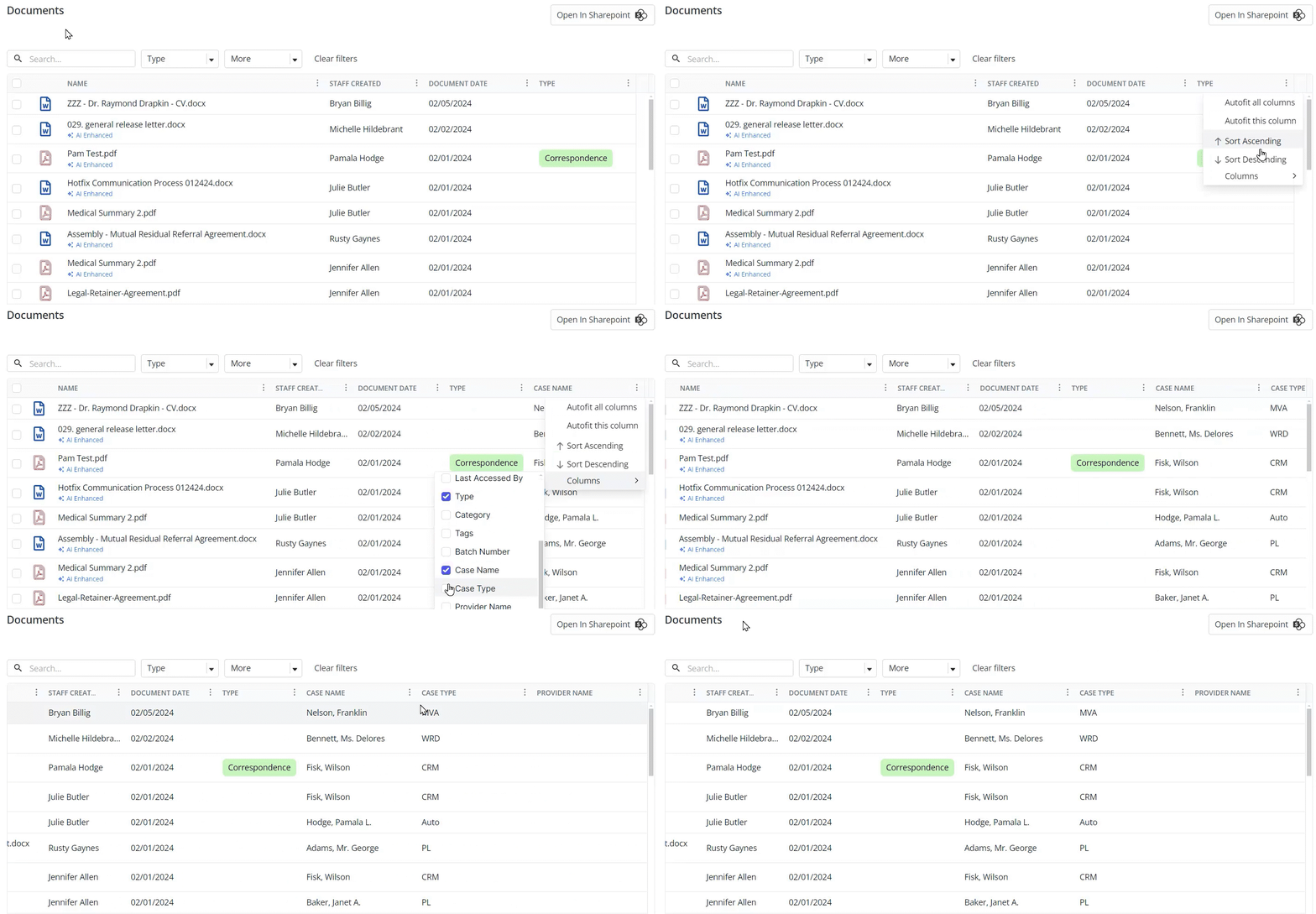
How to use it
- Three new columns have been added to the Browse Documents grid
- Case Name
- Case Type
- Provider Name
- Case Name and Case Type will only be populated for case and intake documents
- Provider Name will only be populated for provider documents
- Case Type added as a filter
- Select one or more Case Types to filter by
This was a customer request submitted to the Neos Ideas Portal (see suggestions 1, 2, and 3).
Time Tracking Features (Customer request)
Firms will now be able to utilize a firm-level default time increment as well as have the ability to display time duration as a decimal.
How to use it
- Go to Firm Preferences:
- Navigate to Time & Billing
- Set Default Time increment at the top
- Click the Display Duration as Decimal checkbox to enable this function
This was a customer request submitted to the Neos Ideas Portal.
Enhancements
New Field Added to Documents: Document Summary
Now available for case, provider, and intake documents of any type and accessible in Advanced Search as a filter and column (column only available when searching for case documents).
Ring Central Enhancement
When importing phone calls from Ring Central, a case note will not be created if the phone call is not assigned to a staff member.
Questions?
Contact your customer success manager if you have questions about this release, or sign up for one of our monthly Neos demos for a full product refresh!
For detailed instructions on these enhancements, click the Help icon (question mark) in Neos to access the Self-Serve Portal and Knowledge Base.