
How many times have you been pulled into someone else’s case without time to get up to speed? You know that the client needs to be reassured that your firm is on top of things, but it’s hard to convey confidence when you haven’t worked the case.
Fear not. Activity Feed, one of our latest features in a long list of advancements from Neos legal software, gets you up to speed in a matter of minutes.
Activity Feed is a chronological history of everything that has happened with the case. It is the perfect place to get a clear summary of where a case stands. Using this feature, you can demonstrate confidence and knowledge about every case — whether you’re familiar with it or not.
Activity Feed provides three main benefits to your firm:
1. Case Management
See all your relevant case activity within one screen. Every time someone takes an action on a case, such as entering a task, a note, or uploading a document, an entry is made in the Activity Feed. You can click on items in the feed, such as documents or checklist items, to instantly access, edit, and email — directly within the feed. Send a document via DocuSign directly within the Activity Feed screen. Automate your workflow through trigger-based activities that set reminders and other tasks in motion.
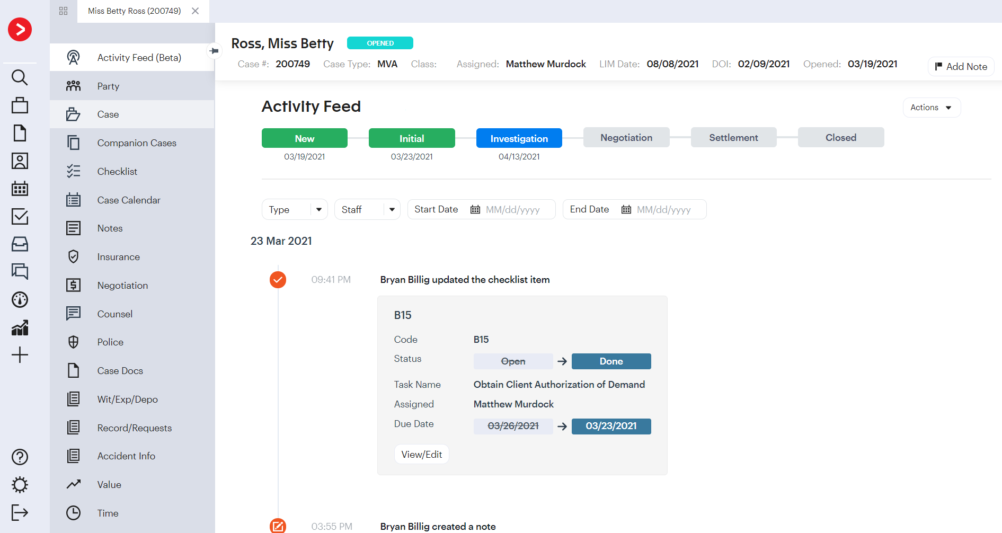
Set up views and filter your Activity Feed so that you can see the exact information you’re looking for, whether it’s a list of all case notes, specific staff members, or even targeted date ranges. Quickly understanding a case has never been easier.

2. Case Phases
Case Phases allow you to quickly see the overall status and timeline associated with important case milestones. Every case moves through customized defined phases that can be set up for each case type based on your ideal workflow and ending with a successful conclusion. Depending on the type of case, this may include Investigation, Negotiation, and potentially even Litigation. As a case progresses and items are marked as complete, the associated status will update – giving you an at-a-glance understanding of important case events. Case phases ensure you always know where a case stands at any time.

3. Tracking Log
Activity Feed works as a running log tracking activity done by users. You can see every update and change made to a case: what was done, when it was done, and who did it. This detailed level of visibility allows you to easily supervise case activities at a team and individual level, encourage quality in your firm, and promptly identify and fix any errors that may occur.
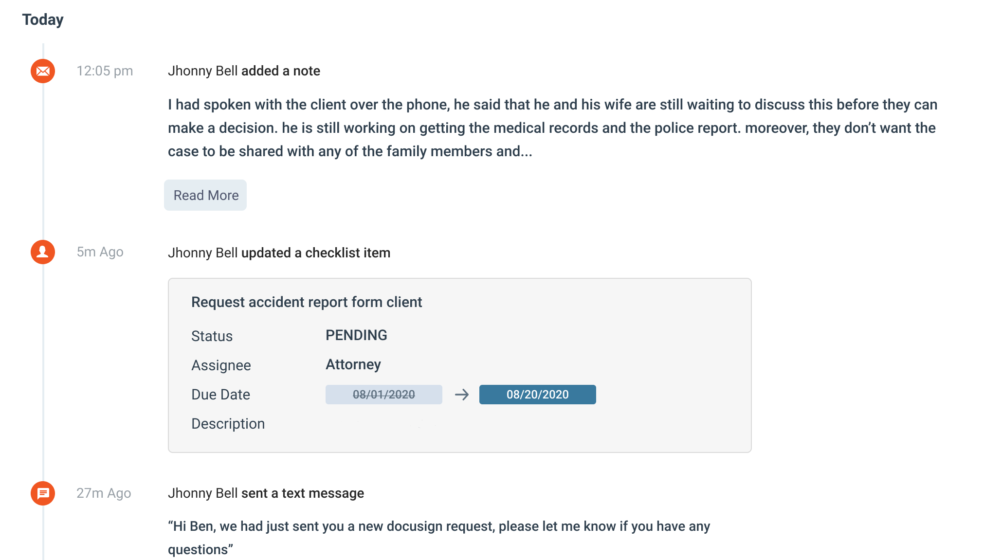
Case details are often complex and can rapidly change. The Activity Feed feature available within Neos, case management software, offers a simple way to access critical case information, with speed and efficiency. Empower your law firm to accelerate productivity by seamlessly moving processes forward from first contact to case resolution.
Contact us to learn more about Activity Feed, and how Neos can help your firm win more cases with less work.


